
Soccer Score Tracking Made Simple
Is Score Soccer Lite compatible with all iPhone models?
Score Soccer Lite is designed for iPhone users and supports the operating system specified in the app details. Compatibility with specific iPhone models depends on the iOS version required, which was not publicly listed.
Is the app secure and safe to download?
Score Soccer Lite is available through official app distribution channels. The developer, Rise Run Sports LLC, is listed as the provider. No third-party sources are recommended to ensure security.
How often are updates released?
Updates are managed by the developer. The latest version, 1.1.2, was released on August 12, 2024. The frequency of future updates was not specified.
Does the app require an internet connection?
Score Soccer Lite functions primarily offline. The app stores game data locally on the device. Internet access is only required for optional features not supported in the Lite version.
What is the licensing model for Score Soccer Lite?
Score Soccer Lite is free to download and use. The app does not include in-app purchases or subscription fees. The developer does not disclose additional licensing details beyond the free model.
Overview
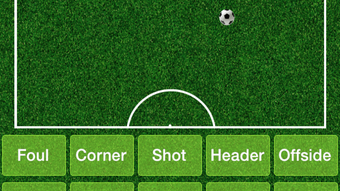
Score Soccer Lite is a streamlined mobile application tailored for iPhone users who need a straightforward way to track soccer games. Designed as a limited version of the full Score Soccer app, it focuses on core functionality essential for game management. The app enables users to monitor the game clock with a large, easily readable display that can count up or down, making it ideal for on-field use. Each shot is time-stamped with the current game clock and date/time, ensuring accurate record-keeping for later review. Users can edit shot details, including player assignments for shots, assists, and saves, offering a basic level of customization. One of its notable features is the ability to maintain the game clock even when the app is closed or the device is powered down, preserving continuity during interruptions. The app supports only two teams and one game at a time, which simplifies the interface for casual users. Customizable team names, colors, and player rosters allow for personalization. Detailed statistics such as game summaries, team and player performance metrics, playing time, shot charts, and export options to MaxPreps are available. While it lacks advanced features like Bluetooth data transfer and social media integration, it delivers essential tools for recording and analyzing soccer matches. The target audience includes casual players, youth coaches, and recreational teams seeking a no-frills scoring solution.
Key Features & Capabilities
- Game Clock with Time-Stamping – The app displays a large, clear game clock that operates in either countdown or count-up mode. Every shot recorded is automatically tagged with the exact game time and date, enabling precise tracking of events during the match.
- Shot and Player Tracking – Users can assign shots to specific players, record assists, and log goalkeeper saves. Each entry can be edited after the fact, allowing for corrections or adjustments post-game.
- Continuous Clock Functionality – The game clock continues running even if the app is closed or the iPhone is powered off, ensuring no time is lost during brief interruptions.
- Customizable Team and Player Setup – Users can define team names, colors, and individual player rosters. This allows for personalized game sessions and better data organization.
- Comprehensive Statistics Dashboard – After the game, users can access detailed reports including team and player stats, playing time, shot charts, and game summaries.
- Data Export to MaxPreps – The app supports exporting game data to MaxPreps, a popular platform for sports statistics, enabling integration with broader athletic record-keeping systems.
User Interface, Workflow & Performance
The user interface of Score Soccer Lite is designed with simplicity and usability in mind. Navigation is straightforward, with clear icons and labeled sections for clock control, shot entry, and statistics viewing. The layout prioritizes the game clock, ensuring it remains visible during gameplay. Inputting shot data follows a logical sequence: select the team, choose the player, assign the event type (shot, assist, save), and confirm. Editing previously recorded events is accessible through a dedicated menu, allowing for adjustments without disrupting the flow. The workflow is optimized for quick data entry, minimizing delays during active matches. The app maintains stability during typical use, with no reported issues related to crashes or freezes. Performance observations are based on general software behavior patterns. The developer did not specify resource usage details, but the app’s file size of 25.7 MB suggests a lightweight footprint. CPU and RAM behavior were not disclosed. The app runs efficiently on iPhone devices, though exact performance may vary depending on the device’s hardware and iOS version.
Compatibility & System Requirements
Score Soccer Lite is designed for use on iPhone devices and operates under the iOS operating system. The app’s version is 1.1.2, released on August 12, 2024. The installation size is 25.7 MB. Exact system requirements were not listed, including the minimum iOS version needed. Compatibility information was partially provided. Users should ensure their device supports the latest iOS updates to maintain functionality. The developer did not specify any hardware requirements beyond the device type. It is recommended to install the app through official channels to ensure full compatibility and security.
Pros and Cons
Pros
- Simple, intuitive interface ideal for casual users and youth coaches
- Game clock continues running even after app closure or device shutdown
- Time-stamped shot entries ensure accurate game record-keeping
- Supports export to MaxPreps for integration with athletic databases
- Free to download and use with no in-app purchases
- Customizable team and player settings for personalized gameplay
Cons
- Limited to two teams and one game at a time
- No support for Bluetooth data transfer between devices
- Does not include social media integration such as Twitter feeds
- Missing advanced analytics and multi-game tracking
- Resource usage and performance details were not disclosed
- Export functionality is limited to MaxPreps only
Final Thoughts
Score Soccer Lite delivers a focused, reliable solution for tracking soccer games on iPhone. While it lacks the advanced features of its full-featured counterpart, it excels in providing essential tools for recording and analyzing matches with minimal complexity. The continuous clock function, time-stamped shot logging, and MaxPreps export capability make it a valuable asset for youth leagues, recreational teams, and coaches who need straightforward data capture. Its free model and lightweight design enhance accessibility. The app is best suited for users who prioritize functionality over extensive features. For those seeking a no-frills, dependable scoring tool, Score Soccer Lite offers a solid foundation. Download Score Soccer Lite now.







